• youtube
  • linkedin
  • twitter
  • Facebook
  • Help
  • News
  • Home
  • Home
  • Our Products
    • An Overview
    • TimeTabler
    • Options
    • StaffCover
    • The Timetabler’s
      CookBook
    • The TOOLS
      online System
    • FAQs
    • Links to MIS
    • Help & Support
  • Our Schools
    • Comments
      & Testimonials
    • TimeTabler around
      the World
    • Existing customer ?
      Upgrades & Renewals
    • TimeTabler for MATs
  • How to order
    • Tutorial Versions
      (try before you buy)
    • Book an Online Demo
    • FAQs
    • Users’ Comments
    • New customer ?
      Order Now
    • Existing customer ?
      Upgrades & Renewals
    • How to Pay
  • Help & Support
    • Help in 12 ways
    • New To Timetabling?
      Skills, principles, etc
    • Moving from Nova-T6
    • Free Timetabling Booklets
    • Support Centre
    • Training & Courses
      On-site, workshops,
      webinars, etc
    • Help Movies
    • Exporting to your MIS
    • Upgrades & Renewals
  • Downloads
    • Free Downloads
    • TimeTabler Tutorial
    • Options Tutorial
    • StaffCover Tutorial
    • Free Timetabling Booklets
    • Principles & materials
    • Physics teaching
    • Readability tests
    • Lesson Loader
  • Contact Us

VAT Rules

Woman Timetabling on Chalk Board
  • Help in 12 Ways
  • Existing Customers
  • Upgrades/Renewals

Testimonials

Peter Hall
Head and shoulders above the competition.Derek SimpsonKnox Academy, Scotland
Joe Bettle
Felix Posner
Richard Lynn
Karen Colwill
I can recommend TimeTabler and Options to anyone.John MackenzieDunalastair School,Chile
Linda Peters, 15
TimeTabler has an extraordinary degree of flexibility.Mary SasoSacred Heart, Japan
TimeTabler and Options give me the flexibility and ease.Anton KokKing’s School, Somerset

Home / VAT Rules

VAT Rules : Paying VAT on your Orders

This page provides an overview of the current UK VAT (Value-Added Tax) rules, which may differ depending on the country from which you are ordering.  Please take some time to read the information below and to determine which rules apply in your tax jurisdiction.

If you are registered for VAT in your tax jurisdiction, you can claim back VAT on your orders.


VAT for UK-based Purchasers :
Schools based in the United Kingdom that wish to buy TimeTabler, Options, StaffCover, or the TimeTabler Manual, will be charged VAT on their order, currently set at 20%.

For UK-based orders of A Timetabler’s CookBook, VAT will not be charged, because books are not subject to VAT in the UK.


VAT for EU-based Purchasers :
Following the withdrawal of the United Kingdom from the European Union, VAT rules for EU-based customers ordering from the UK have changed.

Schools based in the European Union that wish to buy TimeTabler, Options, StaffCover, or the TimeTabler Manual, will not be charged VAT by October ReSolutions Ltd, but may still be expected to pay VAT in their EU country or tax jurisdiction.

Please consult local VAT rules to determine whether you should pay VAT on your order.  Current VAT rates for EU countries are provided on the European Commission website.

N.B. Many countries charge a different rate of VAT on physical copies of books, which may affect the VAT due for purchases of A Timetabler’s CookBook.


VAT for Purchasers based outside the UK and the EU :

Schools based outside the UK and the EU that wish to buy TimeTabler, Options, StaffCover, or the TimeTabler Manual, will not be charged VAT by October ReSolutions Ltd on their order.


If you have any questions, please contact us at accounts@timetabler.com – thank you.

Home / VAT Rules

The TimeTabler Newsletter

Our free Monthly Newsletter for School Timetablers:  Click here for more info, or to sign-up.

Logo

October Resolutions

  • About Us
  • Contact Us
  • Careers at TimeTabler
  • Data & Privacy
  • – – – – – – – – – – –
  • Help & Support
  • Associates & Training

Our Software

  • TimeTabler
  • Options / Electives
  • StaffCover
  • – – – – – – – – – –
  • Free Tutorials
  • Add to Wish-List
  • How to Buy

Extras & Services

  • Timetabler’s CookBook
  • TOOLS (for Options)
  • Training & Courses
  • – – – – – – – – – –
  • Free Resources
  • New To Timetabling ?
  • Gold-Start Support

Stay in contact

  • Contact Us
  • Read our Blog/News
  • ----------
  • Social Media
  • ----------
  • Tell a Friend
  • Our NewsLetter

© 1979-2026 October Resolutions Ltd

  • Terms & Conditions
The 'master' Class Printout Screen

Class timetable printout screen

This shows you the Preview Screen , so you can design the ‘master’ Class printout, before printing it.
 
There are similar screens for the Staff Timetables and for the Room Timetables.
 
You have total control over the design, the font and the colour, the column widths, the labels, etc, etc.
 
All the buttons and the controls, are explained when you click on the button.

The Printout Menu

This shows you some of the possibilities for the Printouts.
 
Within each of these, there are millions of ways of fine-tuning the exact design of the Printouts.

They can be printed on paper, or produced as web-pages, at the click of a button.

A professional result.
 

Class Timetable Screen


visual builder screen


This shows you the Class Timetables, so you can see the pattern while you are scheduling lessons.
  
There are similar screens for the Staff Timetables and for the Room Timetables.
 
If you use dual monitors you can see these more easily and spread them out over the bigger area.

All the buttons, and the symbols, are explained when you click on the button.

Visual Builder Screen

visual builder screen

This is the main screen on which you do the actual scheduling.
You can sit at this Visual Builder Screen and drag-and-drop to ‘drive’ through the timetable.
 
At first sight it looks very complicated.  To see what each part will do for you, please click on: www.timetabler.com/kb/UsingtheVisualBuilderScreen.pdf

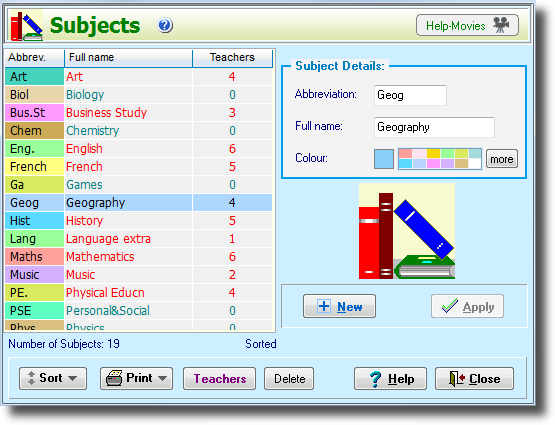
Subjects Screen

subjects screen

This is the screen for saying which Subjects you will want to timetable.

You can return here at any time to edit / alter your data.

You can give each Subject a colour – this helps during scheduling, and for the printouts.

Basic Data

BasicData-thumbnail

This shows the Main Menu, and Step 1 : the Basic Data screen, with five big buttons.

Each button leads you to an entry screen.

To enter your data you would start at the left, and work your way across to the right.

Look how straightforward it is, compared to other programs !

And the fully-illustrated printed Manual explains each step, in detail.