 - about TimeTabler, - what it looks like, - what it does.
Timetabling (scheduling) a school or college timetable using computer software.
Timetabling (scheduling)
has a powerful effect on the life of a school or college, and if you are a timetabler
you carry a heavy responsibility.
Modern software can relieve you of much of the donkey-work
of timetabling, leaving you with more time to apply your skill and judgement
where they are needed in order to produce a timetable of the highest quality.
This page gives
you an introduction to a widely-used timetabling program called TimeTabler.
This extremely popular and proven computer software will schedule your timetable
for you.
Do not confuse this program (Keith Johnson's TimeTabler) with other programs with similar names.
Later you can download a copy of the software, with a Tutorial and some demonstration data.
On this page :
- about TimeTabler,
- what it looks like,
- what it does.
TimeTabler
TimeTabler is a fast and friendly computer program, based on many years of timetabling experience, carefully designed to help you to schedule your timetable quickly and accurately.
TimeTabler requires no knowledge of computers. It is designed to allow you to sit at the keyboard controls and ‘drive’ your way through the timetable. The easier way.
TimeTabler has been continuously developed and improved by Keith Johnson and a team of expert timetablers over a period of 30 years, using the many comments provided by a large number of users in a variety of situations.
Many hundreds of schools and colleges, in over 70 countries, now use TimeTabler
to do the actual scheduling of their timetables on a computer.
Click here to see the Comments made by
Timetablers who have used our software.
TimeTabler will cope easily with the largest school. And yet it is friendly for small schools as well.
Look how friendly the screens are:
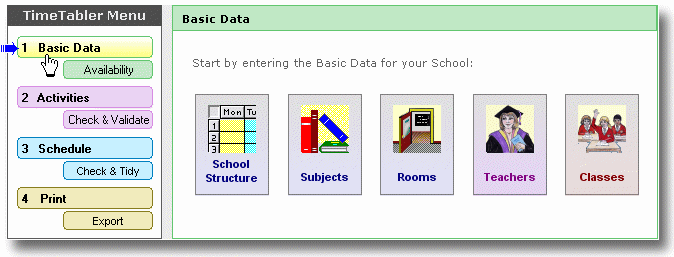
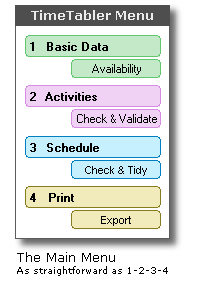
It's as straightforward as 1-2-3-4. This is the screen for Step 1 : entering your Basic Data.
And every screen has a Help button, to explain what each part does.
You can see more examples of the Windows screens by clicking
here.
Click here to see a Video about the 4 steps in TimeTabler. 
TimeTabler
is based on long timetabling experience. It's friendly & intuitive.
You stay in full
control and can over-ride the machine at every stage.
And it is supported by a 24/7 Support Centre and a team of experienced timetablers. We are the experts.
It will
run on any PC with Windows 98, XP, Vista, Win-7, or later. ('Mac' Users can run it by using 'Parallels' or similar.)
 -
the scheduling of part-time teachers,
-
the scheduling of part-time teachers,
- option patterns, maths sets,
- staggered lunch-breaks, variable days,
- split-site schools, consortium days,
- shared teaching in the ‘Sixth
Form’,
- ‘consistently-setted’ blocks,
- etc. etc.
TimeTabler can deal with ANY curricular structure, of ANY complexity.
No other timetabling program can claim this.
And you can use
our HelpLine Support if you need help or advice
with any aspect of your timetable.
TimeTabler
is
totally self-checking. For example: it will never allow you to
allocate by mistake any one teacher to two classes at the same time; and it will
always warn you if you begin to put two classes in the same room; or if you
decide to put two separate lessons of Maths on the same day, etc. etc.
This means that the timetable is guaranteed to work when the new term starts.
TimeTabler will automatically take care of all normal requirements like putting 5 periods of French on 5 different days (unless you tell it not to).
Using the high
speed of the computer, combined with efficient & proven timetabling algorithms,
TimeTabler looks ahead and shows you
at every stage a recommended list of Priorities
for you to consider.
That is, it recommends which
lesson you should place on the timetable, and where
you should place it !
At every stage, you can follow the program’s advice or you
can make your own decision.
In this way you get the very best result of the computer’s
speed combined with your judgement & experience & your knowledge of
your colleagues.
This is the way to get a quality timetable.
Other programs don't do this for you!
| But in addition to this mechanical checking and prioritizing, TimeTabler will do far more - it will do the actual scheduling of the timetable for you , | ||
|
- either interactively (you and the machine working together), |  |
|
- or automatically (you relax while the machine does the work), | |
|
- or both (swap between them, whenever you wish). | |
| There are more details shown on the next TimeTabler page. | ||
| AND TimeTabler has a superb special feature called FIT. | |
| If a problem lesson will not fit into your timetable, then TimeTabler will quickly search through millions of complicated ‘musical chairs’ moves in order to find and show some solutions for you to choose from ! |  |
| It’s fast and clever ! Wonderful ! | |
| Users’ comments |  |
| Click here to see what other timetablers have said about us. | |
| See what experienced timetablers say. |
FAQs
- Frequently Asked Questions
Click here to see the Answers, or get
an Order Form.
More
details
Click here to move to the next
page, for more details of how TimeTabler works.
 |
 |
«
Just click on items in the menu to see more details.
If you have
any queries, please e-mail them to: keith@timetabler.com
We will answer any questions you may have about using
the software with your particular curriculum.
© Chris & Keith Johnson